SkyFlow
SkyFlow is SkyTrade's token distribution platform that makes it easy to create and claim token airdrops on Solana. Using advanced Merkle tree technology, SkyFlow ensures secure and efficient token distribution to recipients.
What Is SkyFlow?
SkyFlow is a user-friendly platform that allows you to distribute SPL tokens (Solana tokens) to multiple recipients through airdrops. Whether you're a project launching a token, rewarding community members, or distributing tokens to a specific group, SkyFlow simplifies the entire process.
The platform uses Merkle trees - a secure cryptographic method - to verify that recipients are eligible to claim their tokens. This means you can create an airdrop distribution list, and recipients can securely claim their tokens without you having to send individual transactions to each wallet.
How It Works
For Airdrop Creators
Prepare Your Distribution List: Create a CSV file with the wallet addresses and token amounts you want to distribute. The CSV file must follow this exact format:
pubkey,amount_unlocked,amount_locked,category
F79AjWRUENcPoqqCgLZN7zhVJeQXNYXPKwfte9B8Tjdn,20,0,Staker
3Nw17YW1g2YX2ePbSeSXtZFXZs8AHB94eNFCUWgwvUPm,20,0,Staker
CSV Format Requirements:
- pubkey: The Solana wallet address (public key) of the recipient
- amount_unlocked: The number of tokens that are immediately available to claim
- amount_locked: The number of tokens that are locked (vested) and cannot be claimed immediately
- category: A label or category for the recipient (e.g., "Staker", "Contributor", "Early Adopter")
Create Your Airdrop: Upload your CSV file to SkyFlow. The platform will process your list and create a secure Merkle tree-based distributor.
Get Your Airdrop Details: SkyFlow generates:
- An Airdrop Version number (which needs to be unique for multiple airdrops of same token mint)
- A Pinata IPFS JSON URL (a secure link to your distribution data)
- The Token Mint Address (the token you're distributing)
Share With Recipients: Provide recipients with these three pieces of information so they can claim their tokens.
For Token Recipients
Visit the Claim Page: Go to SkyFlow and navigate to the claim page.
Connect Your Wallet: Connect your Solana wallet to verify your eligibility.
Enter Airdrop Details: Provide:
- The Airdrop Version number
- The Token Mint Address
- The IPFS Link (Pinata URL)
Claim Your Tokens: If your wallet address is in the distribution list, you'll be able to claim your tokens instantly. The tokens will be sent directly to your connected wallet.
How to Use SkyFlow
Creating an Airdrop
- Visit SkyFlow and connect your wallet
- Navigate to the Admin Dashboard
- Prepare your CSV file following the required format (see CSV Format Requirements above)
- Upload your CSV file with recipient addresses and token amounts
- Select the token mint address for the tokens you want to distribute
- Configure the distributor settings (airdrop version, vesting dates, clawback settings)
- Generate the Merkle tree and optionally upload to Pinata (IPFS)
- Create the distributor on-chain and fund the distributor vault
- Save the generated airdrop version, IPFS URL, and token mint address
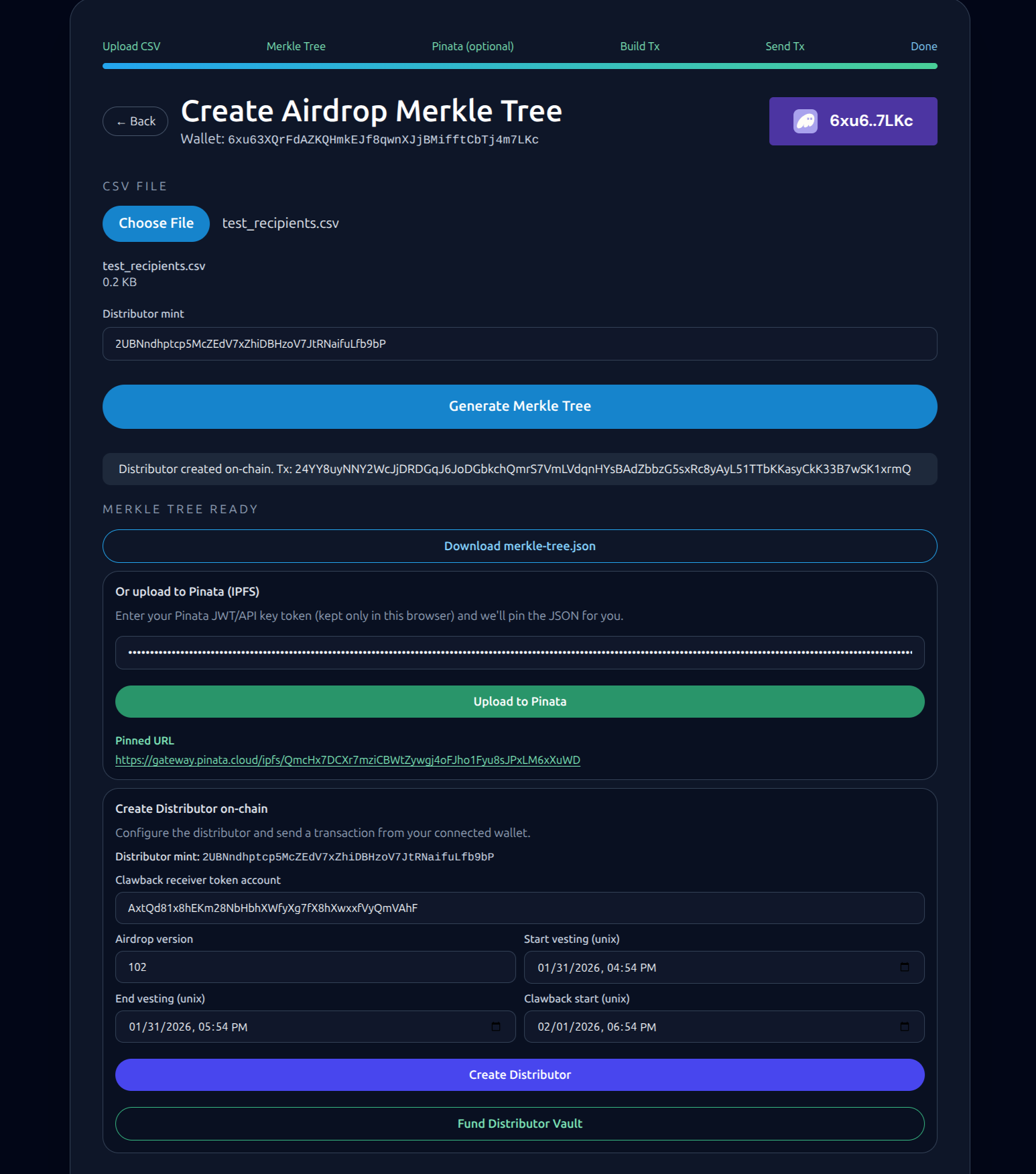
Admin Dashboard: Create Airdrop Merkle Tree interface showing CSV upload, Merkle tree generation, Pinata IPFS upload, and on-chain distributor creation
Claiming Tokens
- Visit SkyFlow and connect your wallet
- Go to the "Claim Airdrop" page
- Enter the Pinata IPFS URL (Merkle Tree JSON) in the PINATA URL field and click "Fetch JSON" to load the distribution data
- Enter the Token Mint Address provided by the airdrop creator
- Enter the Airdrop Version number
- Click "Claim Tokens" to initiate the claim process
- Follow the progress steps: Fetch JSON → Build Tx → Sign Tx → Send Tx → Done
- Once completed, your tokens will be sent directly to your connected wallet

Claim Airdrop interface showing the Pinata URL input, claim configuration with token mint address and airdrop version fields, and the claim tokens button
Current Airdrop Information
The following table contains the current airdrop details. Note: The Airdrop Version and Pinata IPFS JSON URL are updated monthly, while the Token Mint Address remains constant.
| Airdrop Version | Date | Pinata IPFS JSON URL | Token Mint Address |
|---|---|---|---|
| 03 | January 2026 | https://ipfs.sky.trade/ipfs/QmPMrPMh5hJjQ1NrSGVp8FuaGxK5tsMVyxaWjrmAZZmiaf | 4fVm6TbqF9SUhVxWr2S49UkNTwUgBjQPQG95K9oeKSKY |
Important Notes:
- The Airdrop Version and Pinata IPFS JSON URL are updated monthly
- The Token Mint Address remains constant across all airdrop versions
- Always verify you're using the correct airdrop version before claiming
- Make sure you're connected to the correct Solana network (mainnet)